
Architecture diagrams from your live model.
See your architecture as it actually is - diagrams generated directly from the workspace, refreshed as the model changes.
Architecture diagrams usually fail in one of two ways: they are drawn once and never updated, or they live in a separate tool that drifts the moment the model changes.
Albumi generates diagrams from the same workspace that holds the architecture data. Some views are curated by hand, others are generated for you, but both stay tied to the live model.
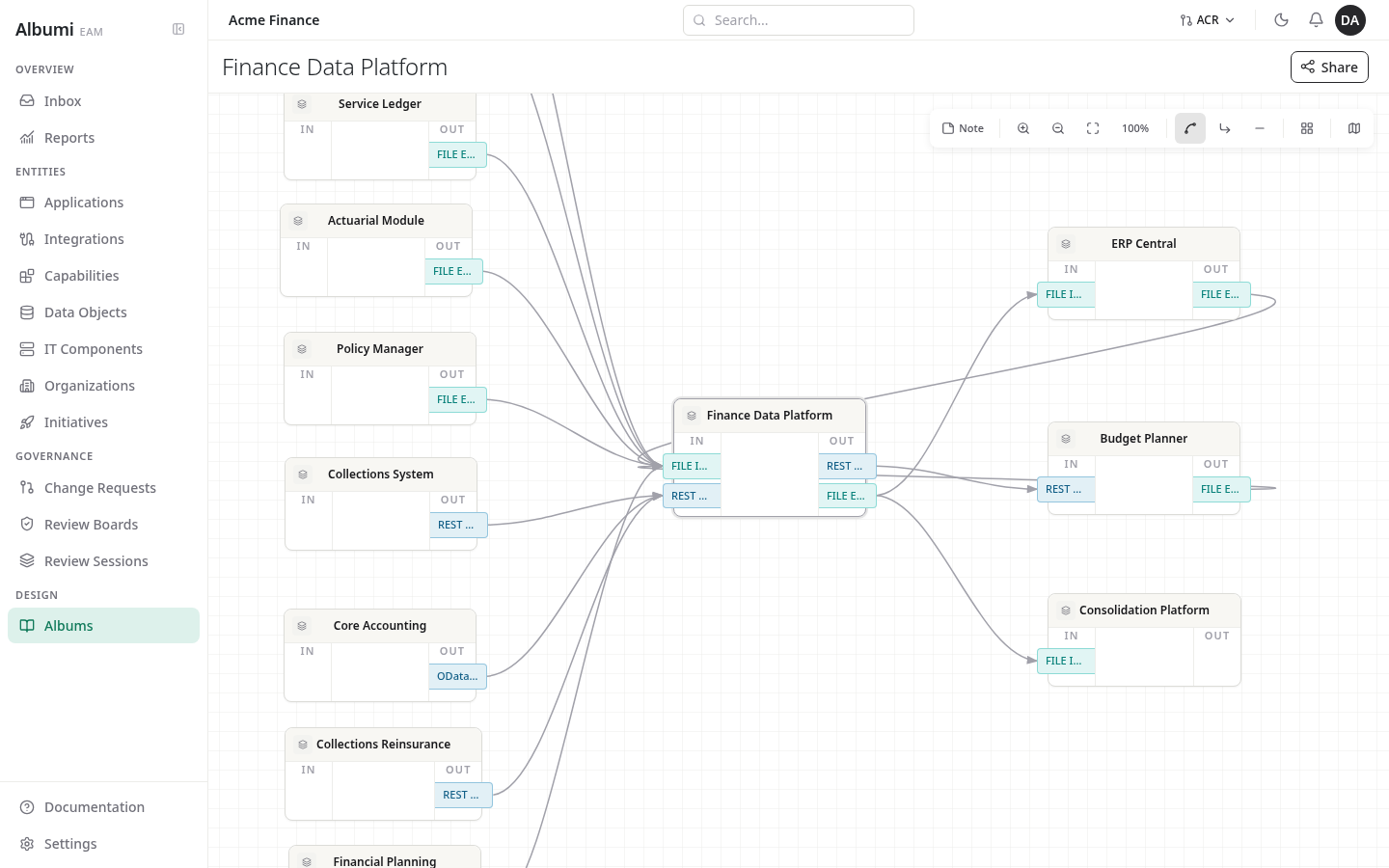
How the diagrams stay live.
Live Albums
Pick the entities, save the layout, and share the view. The system draws the relationships while keeping the diagram tied to the model.
Auto Albums
Applications get integration maps, data objects get lineage views, and workspace-wide landscape pages can be generated without manual upkeep.
Change Request visuals
Proposed changes can render as reviewable diagrams, so approvers see the diff in context before they vote.
Inline dependency views
Every entity page shows the connected systems, data objects, capabilities, and components without a separate report.
What teams use them for.
Current-state diagrams people trust
Renames, lifecycle changes, and new integrations propagate automatically, so the diagram stays aligned with the actual model.
Instant "what connects to this?" answers
Applications and data objects can render their own maps, so basic dependency questions stop turning into research projects.
Faster onboarding
New joiners can open the relevant application, data object, or diagram and understand the terrain without chasing the original authors.
Album details.
What is an Album?
An Album is an architecture diagram built directly on top of your workspace. The layout and connections come from the data - you curate which entities the Album includes, then the system draws the relationships between them. Add an integration in the catalog and it appears on every Album that includes its endpoints. Rename an application and every Album that referenced it updates.
What types of pages can an Album contain?
Manual pages (you arrange entities and draw connections by hand), Lineage pages (auto-generated per data object, with CRUD-labelled flows), Application Integration Map pages (auto-generated per application, hub-and-spoke), Landscape View pages (auto-generated workspace groupings by hosting / classification / criticality), and DefineSources pages (specialised for declaring data origin). Manual pages are editable; Auto page types are recomputed from the model on every load.
What's the difference between Live Albums and Auto Albums?
Live Albums are curated by hand - you pick the entities and save the layout for a specific audience or use case. Auto Albums are generated by the system: an Application Integration Map for every application, a Data Object Lineage page for every data object, plus Landscape Views grouped by hosting and data classification. You don't maintain Auto Albums; they always reflect the current state.
What happens to my Album when an entity is renamed or retired?
Renames propagate automatically - the entity reference updates everywhere it appears. Retiring an application that's referenced in a Live Album leaves the saved layout intact but the entity badge reflects its lifecycle status (Phase-Out, End-of-Life). Auto Albums are regenerated on every load, so they always reflect the current model.
See the current state, not last quarter's slide.
See your real architecture as it actually is - auto-generated diagrams included on every plan.